
A BuildZoom score is a numerical rating from 0 to 108+ that aggregates a contractor's license status, insurance, permit history, and client feedback into a single reference point. For homeowners in Keller planning a home addition, garage build, or major renovation, learning to check contractor BuildZoom ranking data is one of the fastest ways to screen out unqualified candidates before you ever pick up the phone. The score draws from 3.5 million contractors and 300 million permits across the U.S., which makes it a genuinely useful starting filter. That said, BuildZoom is a starting point, not a final verdict. This guide explains exactly how to read, verify, and supplement those scores for Texas projects.
How to check contractor BuildZoom ranking and what the score means
BuildZoom calculates its contractor performance rating using five core inputs: active license status, insurance verification, permit activity, local consumer protection records, and direct client feedback. Each factor carries weight, and a contractor who pulls permits consistently will score higher than one who works without them. The score range of 0 to 108+ means that a score in the 90s places a contractor in roughly the top tier nationally, while anything below 70 warrants closer scrutiny.
Score interpretation matters as much as the number itself. A score between 90 and 108 generally reflects a contractor with a clean license history, active permit pulling, and positive client feedback. Scores between 70 and 89 are average and require you to dig deeper into the permit history and review volume. Scores below 70, or a zero score, do not automatically mean the contractor is unqualified. A zero BuildZoom score often signals that BuildZoom could not verify an active license at the time of data collection, not that the contractor lacks one. Always cross-check a zero score against the Texas Department of Licensing and Regulation before drawing conclusions.

BuildZoom data depth varies regionally, and contractors in niche trades or smaller markets may have thinner profiles regardless of their actual quality. The platform earns a 4 out of 5 for ease of use, but its regional variability is a real limitation for Keller homeowners evaluating specialty trades. Additionally, BuildZoom profiles are often auto-generated by scraping public data sources, which can produce outdated contact details, incorrect employee listings, or mismatched license numbers. Treat every profile as a lead, not a confirmed record.
Pro Tip: When comparing two contractors with similar BuildZoom scores, look at permit volume over the past 24 months rather than the total score. A contractor who pulled 12 permits last year is more active than one whose score reflects work done five years ago.
| Score range | What it typically signals |
|---|---|
| 90 to 108+ | Strong license history, active permits, positive feedback |
| 70 to 89 | Average standing; review permit history and feedback volume |
| Below 70 | Requires manual verification of license and insurance |
| Zero | Data gap, not disqualification; verify directly with state board |
What additional checks should homeowners perform beyond BuildZoom?
BuildZoom gives you a snapshot, but manual state verification takes 15 to 30 minutes and fills the gaps that no aggregator platform can cover. For Texas homeowners, the Texas Department of Licensing and Regulation (TDLR) and the Texas State Board of Plumbing Examiners are the authoritative sources for license status, bond information, and disciplinary history. BuildZoom cannot tell you whether a license was suspended last week.
Here is a practical verification sequence for Keller homeowners:
- Search the contractor's name and license number on the TDLR website. Confirm the license is active, not expired or suspended. Note the license expiration date and the specific trade category it covers.
- Check Google Business, Yelp, and the Better Business Bureau. Look for patterns across platforms rather than reacting to individual reviews. A contractor with 40 Google reviews averaging 4.3 stars and 15 BBB reviews averaging 4.1 stars is showing consistent performance.
- Search county court records for civil litigation. For projects over $50,000, a quick search of Tarrant County court records can reveal past disputes over incomplete work, property damage, or non-payment to subcontractors.
- Request proof of general liability insurance and workers' compensation. Ask the contractor to have their insurer send the certificate directly to you. This prevents altered documents.
- Verify the license number is real and matches the contractor's legal business name. A contractor who refuses to share verifiable license details is a clear signal to walk away, regardless of their BuildZoom score.
Understanding what a licensed contractor status actually means in Texas helps you ask the right questions at each step. Many homeowners assume a BuildZoom listing implies verified licensing. It does not. The platform aggregates public data, and that data can be months or years old by the time you view it.
Pro Tip: Run your manual checks the same week you request quotes. License statuses change, and live verification at signing is the only way to confirm compliance at the moment it matters most.
How do BuildZoom rankings compare to other contractor rating platforms?
BuildZoom, Angi, and HomeAdvisor each measure different things, and treating them as interchangeable leads to poor decisions. BuildZoom focuses on permit history and licensing data pulled from public records. Angi and HomeAdvisor rely more heavily on homeowner-submitted reviews, which are easier to game and harder to verify. For a contractor rating check focused on regulatory compliance, BuildZoom is the stronger tool. For understanding customer experience patterns, Angi and Google reviews provide more volume.
Review patterns matter more than star ratings in isolation. A 4.2 rating from 85 reviews is more dependable than a 5.0 from 6 reviews because a larger sample reduces the impact of outlier bias. Six five-star reviews could represent the contractor's friends and family. Eighty-five reviews with a 4.2 average represent a genuine track record. This principle applies across BuildZoom contractor reviews, Google, and the BBB equally.
Watch for these patterns when doing a contractor ranking comparison:
- Review clustering: Multiple five-star reviews posted within the same week, especially with generic language, suggest manufactured feedback.
- Response behavior: Contractors who respond professionally to negative reviews demonstrate accountability. Those who ignore or attack reviewers do not.
- Recency gaps: A contractor with 60 reviews from 2019 to 2022 and nothing since may have changed ownership, lost key staff, or shifted quality.
- Specialization mismatch: A contractor with strong BuildZoom scores in roofing who is bidding your home addition may lack the specific permit history for structural work. Contractor specialization directly affects ranking relevance for your project type.
Step-by-step: how to verify contractor ranking for Keller projects
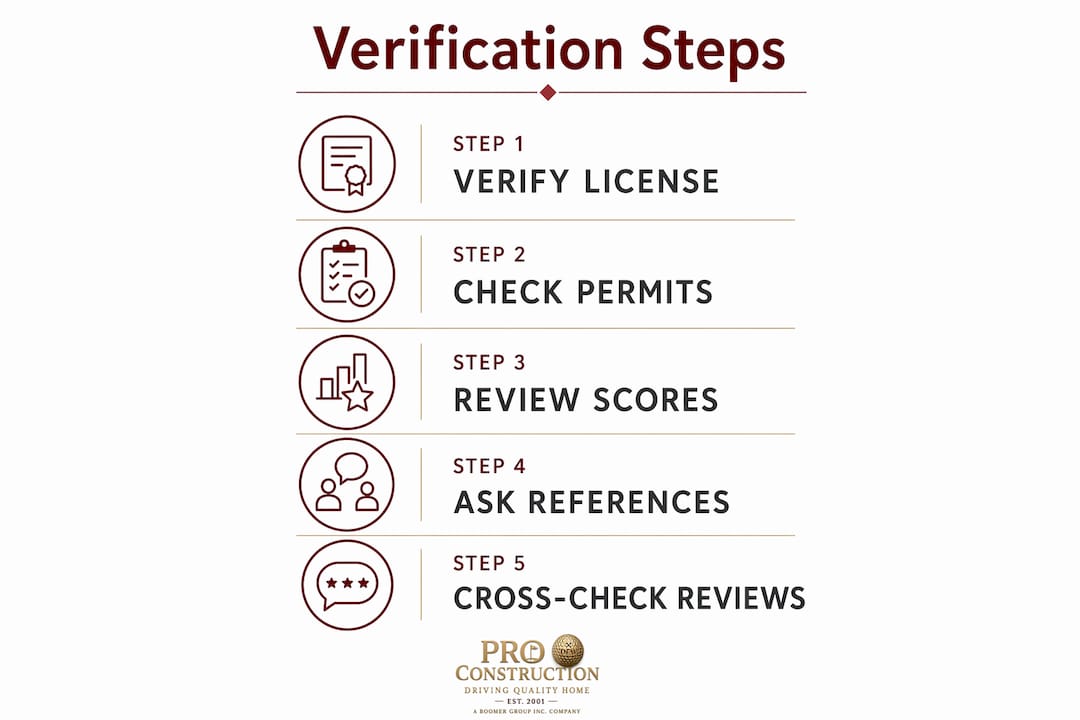
Verifying a contractor's standing for a Keller project takes less than an hour when you follow a structured process. Start with BuildZoom, then move outward to official sources and third-party reviews.
- Go to BuildZoom.com and search the contractor's business name or license number. Review the score, permit history, and any listed reviews. Note the date of the most recent permit pulled in Texas.
- Copy the license number from the BuildZoom profile and enter it into the TDLR license search portal. Confirm the name, license type, and expiration date match what the contractor told you.
- Search the contractor on Google, Yelp, and the BBB. Record the review count and average rating on each platform. Look for the patterns described in the previous section.
- Search Tarrant County district court records online. Use the contractor's legal business name. Any civil judgments related to construction work are public record.
- Request a certificate of insurance directly from their insurer. Confirm general liability coverage of at least $1 million and active workers' compensation.
Pro Tip: Ask the contractor for three references from Keller or Tarrant County projects completed in the past 18 months. Local references are more relevant than out-of-area projects because they reflect familiarity with local permit offices and inspection standards.
When you check contractor credibility across multiple sources, inconsistencies become visible fast. A contractor with a strong BuildZoom score but no Google reviews and an inactive BBB listing is worth questioning. Conversely, a contractor with a modest BuildZoom score but 70 consistent Google reviews and a clean TDLR record may be the stronger choice. The goal is a coherent picture across all sources, not a perfect score on any single platform. For roofing-specific projects, the same multi-source approach applies, as outlined in this guide to hiring reputable contractors.
| Verification source | What it confirms | Time required |
|---|---|---|
| BuildZoom profile | Score, permit history, license snapshot | 5 minutes |
| TDLR license portal | Active license status, expiration, trade type | 5 to 10 minutes |
| Google, Yelp, BBB | Customer experience patterns, review volume | 10 minutes |
| Tarrant County court records | Civil litigation history | 10 minutes |
| Insurance certificate | Active coverage, policy limits | 5 minutes (via insurer) |
Key takeaways
A BuildZoom score is a useful filter but not a final answer. Reliable contractor selection in Keller requires combining BuildZoom data with live Texas state license verification, multi-platform review analysis, and direct insurance confirmation.
| Point | Details |
|---|---|
| BuildZoom score range | Scores run from 0 to 108+; anything above 90 reflects strong permit and license history. |
| Zero score meaning | A zero score signals a data gap, not disqualification; always verify directly with TDLR. |
| Manual verification time | State board and court record checks take 15 to 30 minutes and fill critical data gaps. |
| Review pattern reliability | A 4.2 rating from 85 reviews is more trustworthy than a 5.0 from 6 reviews. |
| License transparency | Any contractor who refuses to share a verifiable license number should be disqualified immediately. |
What 25 years of contractor vetting taught me about BuildZoom
BuildZoom is genuinely useful, and I say that as someone who has spent over two decades in North Texas construction. The permit history feature alone saves homeowners hours of research. But the platform has a structural weakness that most homeowners do not catch: it is a lagging indicator. The score reflects what a contractor did, not what they are doing right now. I have seen contractors with scores in the high 90s who had let their insurance lapse six months prior. The score had not caught up yet.
The red flag I trust most is not a low score. It is hesitation. When a contractor pauses before giving you their license number, or offers to "email it later," that tells you more than any algorithm can. Transparency about licensing is a baseline professional standard, not a favor. The contractors I have seen deliver the best results in Keller are the ones who hand over their license number, insurance certificate, and three local references before you even ask.
My honest recommendation: use BuildZoom to build your initial shortlist, then treat every contractor on that list as unverified until you have confirmed their TDLR status yourself. The 20 minutes you spend on that check is the best investment you can make before signing a contract worth tens of thousands of dollars. For a deeper look at what separates reliable contractors from risky ones, the signs of a reliable contractor framework covers the behavioral indicators that no rating platform captures.
— PRO
Work with a top-rated Keller contractor you can verify
PRO Construction holds a top 1% BuildZoom ranking and has served North Texas homeowners for over 25 years. Every project comes with full license and insurance documentation provided upfront, transparent project timelines, and direct communication from start to finish. If you are planning a home addition or garage build in Keller, you will not need to wonder whether the contractor is legitimate. PRO Construction's credentials are verifiable on BuildZoom, TDLR, and Google before you commit to anything. Explore home addition services in Keller to see current project options and available discounts for qualified homeowners.
FAQ
What is a good BuildZoom score for a contractor?
A score of 90 or above places a contractor in the top tier nationally, reflecting a strong license history, active permit pulling, and positive client feedback. Scores below 70 require additional manual verification before you proceed.
Does a zero BuildZoom score mean a contractor is unqualified?
No. A zero score typically means BuildZoom could not verify an active license from its data sources, not that the contractor lacks one. Always confirm directly with the Texas Department of Licensing and Regulation.
How do I verify a contractor's license in Texas beyond BuildZoom?
Search the contractor's license number on the TDLR website at tdlr.texas.gov. Confirm the license is active, matches the contractor's legal business name, and covers the specific trade category for your project.
Can BuildZoom reviews be trusted on their own?
BuildZoom reviews are one data point, not a complete picture. Review patterns across multiple platforms, including Google and the BBB, are more reliable than any single source, especially when the review volume is low.
How long does a full contractor verification check take?
A thorough check covering BuildZoom, TDLR, Google, BBB, and Tarrant County court records takes approximately 45 minutes to one hour. That time is well spent before signing any contract for a major home project.
Recommended
- The Ultimate Guide to Home Remodeling ROI: Everything Keller Homeowners Need to Succeed - PRO Construction
- Home Addition Contractor in Keller, TX: The 2026 Homeowner’s Buying Guide - PRO Construction
- Construction Company Keller, TX | Discounts for Senior Citizens, First Responders, Teachers, & Military Personnel
- Residential Construction Contracts: A Homeowner’s Guide for Keller & North Texas - PRO Construction